RPG Maker Save Editor
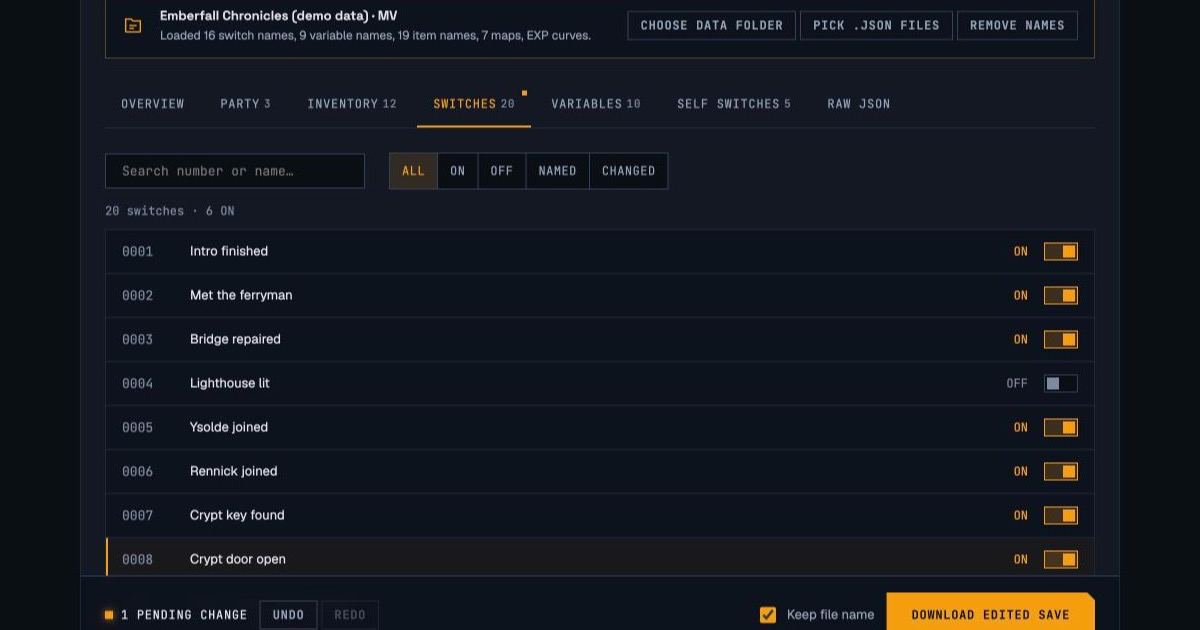
This is the RPG Maker Save Editor (often shortened to RPGM save editor) for MV and MZ: it opens your .rpgsave or .rmmzsave file, lets you edit gold, every actor, the inventory, switches, variables and even where the party stands, and hands back a save in the exact format the game expects. Add the game's data folder and every switch, variable, item and map shows its real name.
Runs 100% in your browser — decompress, edit, and re-encode happen locally. Your file is never uploaded.
Keep a copy of your original save file somewhere safe before editing. This tool can't undo changes to the game itself.
Supports RPG Maker MV & MZ save files (.rpgsave, .rmmzsave), plus decoded .json. Decoding happens in a background thread in your browser — nothing is uploaded.
.rpgsave (MV) .rmmzsave (MZ) file1.rpgsave LZString (MV) or zlib (MZ) formatReading file…
Edit Your Save File
Show real names
Add the game's data folder (www/data on MV) to label switches, variables, items, skills and maps, and keep EXP in step with levels. Read on your device, never uploaded. You can also drop the folder here.
Game flags
Events can switch these off and forget to turn them back on. Flip one back to get out of a soft-lock.
Location & teleport
What's inside this file
Self switches are the A–D flags each map event keeps for itself (a chest that's been opened, an NPC who's already spoken). Only ON switches are stored, so this lists every one that's currently on.
The full decoded save, including RPG Maker's own @ class tags (and on MV, the @c ids, @r links and @a array wrappers). A raw edit is checked before it's accepted: it has to parse, still look like a save slot, and every @r link has to point at an existing @c id.
No changes yet
RPG Maker Save Editor at a Glance
The RPG Maker Save Editor is a free, browser-based tool that opens RPG Maker MV .rpgsave and RPG Maker MZ .rmmzsave save files, lets you change gold, characters, items, switches, variables and the party's location, and downloads a checked copy in the same format the game wrote. The file is decoded on your own device and is never uploaded.
- Works with
- RPG Maker MV and MZ saves:
.rpgsave,.rmmzsave(desktop and browser builds), and already-decoded.json - Save folder
- MV:
www/save/in the game folder. MZ:save/in the game folder - Edits
- Gold, playtime, every actor's level, EXP, HP, MP, TP, stat bonuses and skills, items, weapons, armor, switches, variables, self switches, game flags and position
- Names
- Optional: load the game's
datafolder to see real switch, variable, item, skill and map names - Safety check
- Each download is decoded again, compared with the original's structure, and every edit is read back before the file is released
- Large saves
- Tested with 100,000 switches and 100,000 variables (45 MB decoded): opens in under a second without freezing the page
- Privacy & cost
- Free, no account, no install, no upload
What Is an .rpgsave or .rmmzsave File?
And which of the files in the save folder is the one you want.
An .rpgsave file is an RPG Maker MV save, and an .rmmzsave file is an RPG Maker MZ save. Both hold the same thing, a snapshot of the game's state (party, inventory, switches, variables, map position) serialized with RPG Maker's JsonEx format, but they're compressed differently: MV uses LZString text, MZ uses zlib. Neither opens usefully in a text editor or a generic JSON tool. You need something that reverses the compression and understands JsonEx, which is what the editor above does.
| File | What it is | Open it here? |
|---|---|---|
| file1.rpgsave, file2.rpgsave… | MV save slots, one playthrough each, numbered like the load screen. | Yes |
| file1.rmmzsave, file2.rmmzsave… | MZ save slots. MZ games that use autosave keep it in file0.rmmzsave. | Yes |
| global.rpgsave / global.rmmzsave | The index the load screen reads: title, playtime and face images for each slot. No game state. | No, the tool explains why |
| config.rpgsave / config.rmmzsave | Options-menu settings such as volume and always-dash. | No, the tool explains why |
| file1.rmmzsave_ | A leftover backup MZ makes while writing a save. It only stays behind if a save was interrupted, and it's the previous version of that slot. | Yes, after removing the trailing _ |
Where RPG Maker MV and MZ save files are
| Where the game runs | RPG Maker MV | RPG Maker MZ |
|---|---|---|
| Windows / Linux download | <game folder>/www/save/ | <game folder>/save/ |
| Steam | Right-click the game in your library, choose Manage, then Browse local files, and open the folder above. | |
| macOS app | Right-click the .app, choose Show Package Contents, and look for the same save folder inside it. | |
| Web browser (itch.io, etc.) | The page's localStorage; see the FAQ to export it | The page's IndexedDB via localforage; see the FAQ |
| Android / iOS app | Inside the app's private storage, which needs a device backup or root access to reach. | |
Steam Cloud tip: if the game syncs saves through Steam Cloud, Steam may notice that the local file is newer than the cloud copy the next time you launch. Choose to keep the local file, or Steam can quietly put the unedited version back.
How RPG Maker Saves Actually Work
The part most save editors skip explaining. It's also the reason a naive one can quietly break your file.
Whatever you typed to get here — RPG Maker save editor, rpgm save editor, rpgmaker edit, or just rpg save editor for short — you're looking for the same thing: a tool that actually understands the file RPG Maker wrote, not just raw text. RPG Maker doesn't write your save as plain, readable JSON. Two things happen to the data first, and skipping either one is how a save gets quietly corrupted:
- It's compressed, and MV and MZ don't use the same compression. MV runs the save through LZString and writes it as base64 text, which is why a
.rpgsaveopened in a text editor is a wall of letters. MZ deflates it with zlib instead, then writes that binary data as if it were text: every byte above 127 is stored as two UTF-8 bytes. That last quirk is why an editor that treats an.rmmzsaveas plain zlib fails to open real desktop saves, or writes back a file the game refuses to load. This tool tells the three variants apart from the file's own bytes and writes the result back in whichever one it received. - It's built from linked objects, not flat data. Once decompressed, the save is RPG Maker's JsonEx format. Every object carries an
@key with its class name (Game_Party,Game_Actor), which the engine uses to give it back its methods on load. MV goes further: every object also gets a numeric@cid, a second reference to the same object is saved as an@rpointer to that id, and every list is wrapped as{"@c": 12, "@a": […]}. MZ dropped the ids, links and wrappers entirely. - Why a generic JSON editor gets this wrong. On an MV save, the party's member list isn't a list at all. It's an
@awrapper, so a tool that looks for a plain array finds an empty party and no switches. And a tool that rebuilds the file from scratch drops the@tags or turns@rlinks into copies: the JSON still looks fine by eye, but the game loads your party as plain objects with no methods and crashes, or quietly splits one shared object into two. - What this tool does differently. It never rebuilds anything. The decoded tree keeps every
@,@c,@rand@aexactly as the game wrote them, reads through the links and wrappers when it shows you data, and when you edit, it changes only the one value you touched. Even list edits follow the engine's own rules: a learned skill is inserted in sorted order likelearnSkilldoes, and an item set to 0 is removed rather than stored as 0, likegainItemdoes. - What the check before download actually verifies. Three things, and any failure blocks the download. First, the new file is decompressed with the same decoder the game uses and must give back the exact same text, character for character. Second, the object graph is compared with the file you loaded: same number of objects, the same count of every class, the same number of array wrappers, and no
@rlink pointing at nothing. Third, every edit in your pending list is read back out of the new file and must hold the value you set.
How to Edit an RPG Maker Save File
Where the file lives depends on whether the game runs on MV or MZ. Everything after that is the same for both.
Find your save file
On MV, saves are fileN.rpgsave inside the game's www/save/ folder. On MZ, they're fileN.rmmzsave inside a save/ folder next to the game's own index.html (on Steam: right-click the game, Manage, Browse local files). The global and config files in the same folder aren't playthroughs; pick a numbered one. Browser-based game? The FAQ covers exporting it.
Load it, and optionally the game's data folder
Drop the save into the panel above. It decodes in a background thread with a live progress bar and a Cancel button, so even a very large save never freezes the page. Then add the game's data folder (www/data on MV) to swap bare numbers for real names like Switch 12 · Bridge repaired.
Make your edit
For example, to get past a door a buggy event never opened: go to Switches, type door in the search box, and flip the switch on. Every changed field gets an amber marker, the dock at the bottom lists each change with its old and new value, and Undo (Ctrl/⌘+Z) works the way you'd expect.
Download the verified result
Click Download Edited Save. The file is re-encoded in the same format it arrived in, decoded again the way the game will decode it, compared structurally against the original, and every one of your edits is read back from the new file. If anything doesn't match, the download is blocked and you're told why.
Keep the backup until it's confirmed working
The download keeps the original file name, so it can go straight into the save folder. Copy the original somewhere safe first, load the edited save in-game, and only then delete the backup.
What You Can Edit
One row per tab in the editor above, with the kind of problem each one actually solves.
| Category | What it actually controls | Example |
|---|---|---|
| Overview | Gold, playtime, step count, times saved, battles, victories and escapes, plus four game flags: saving, the menu, random encounters and the formation command. | Turn Save back on after an event disabled it and never re-enabled it. |
| Party | Every actor in the save, not just current members: name, nickname, level, EXP, current HP/MP/TP, the eight permanent parameter bonuses, and learned skills. With the data folder loaded, changing the level moves EXP along that class's curve, and the reverse. | Take a benched character from level 9 to 30 without the game quietly pulling them back down at the next battle. |
| Inventory | Item, weapon and armor counts. Add anything by id, or with the data folder loaded, search the full database by name and set a count. | Put the Crypt Key back in the bag after a plugin swallowed it. |
| Switches | Every global on/off flag, including ones the game has never set yet, searchable by number or by name. | Flip the switch a stuck cutscene is waiting on. |
| Variables | Every numbered variable, decimals and text included. Values a plugin stored as a list or object are shown read-only here and editable in Raw JSON. | Set a reputation or chapter counter that gates later content. |
| Self switches | The A–D flags each map event keeps for itself. Turn one off to reset that chest or NPC, or on to skip it. | Make a one-time boss fight on map 4 available again. |
| Location | Where the party stands. Queue a teleport to any map and tile using the engine's own transfer, applied the moment the save loads. | Walk out of a wall you clipped into. |
| Raw JSON | The whole decoded save, editable in place or as an exported .json file, with the same link and structure checks before it's accepted. | Adjust plugin data the other tabs don't expose. |
What to Look For in an RPG Maker Save Editor
Five questions that separate an editor that works on real saves from one that works on the developer's test file.
| Ask this | Why it matters | This editor |
|---|---|---|
| Does the file leave my computer? | Upload-based editors hold your save on a server, at least for a while. A browser-only tool has nothing to keep. | Never uploaded; decoding and encoding run in your browser. |
| Does it open desktop MZ saves? | Desktop MZ writes compressed bytes as UTF-8 text. A tool that treats the file as plain zlib either can't open it or writes back a file MZ won't load. | Detects all three encodings and writes back the one it received. |
| Does it keep JsonEx links and class tags? | MV saves link shared objects with @r ids and wrap lists in @a. Losing either loads as broken data in-game. | Keeps every tag, id, link and wrapper exactly as written. |
| Can it show names instead of numbers? | "Switch 147" means nothing. "Switch 147 · Crypt door open" is a fix you can make with confidence. | Reads names from the game's own data folder, locally. |
| Does it check the file before handing it over? | A broken save usually shows up hours later, as a crash on the load screen. | Decodes the output again, compares structure, and reads back every edit. |
How We Tested This Editor
What was actually run, what it proved, and where the evidence is still thin.
Every save format the editor supports is covered by an automated test that builds a save the way the engine itself does and then loads the editor's output back the way the engine does. That means ports of MV 1.6's and MZ's own JsonEx serializers and StorageManager read/write code, including MZ's UTF-8 quirk. The test passes only if the reloaded save has every edit, every class restored (Game_Party, Game_Actor…), and every shared object still shared rather than copied. The first real-world file was a genuine MZ save from a published game (RMMZ Academy), written by that game's own engine running in the browser in September 2026. That test is what exposed the MV-vs-MZ compression difference in the first version of this tool.
| Scenario | Checked | Result |
|---|---|---|
MV 1.6 save (@c/@r/@a) | 23 kinds of edit, then reloaded through MV's own JsonEx.parse | Pass: edits present, links and classes intact |
| MZ desktop save (UTF-8 zlib) | Same 23 edits, reloaded through MZ's file read path | Pass: output stays UTF-8 form, as MZ expects |
| MZ browser export (raw zlib) | Same 23 edits | Pass: output stays raw zlib |
| No edits at all | Downloaded file decodes to the original data | Pass: identical, character for character |
| Console-pasted MV save | Quotes, line wraps and a trailing newline around the text | Pass: opens normally |
| Wrong files | global, config, empty, damaged zlib, ZIP, XP/VX Ace Marshal | Pass: a specific message for each, no hang |
| Invalid edits | Negative gold, level 0, unknown actor, bad self-switch key | Pass: rejected before any file is made |
Large-save performance
A deliberately extreme save, far beyond what RPG Maker's own editor lets a project reach: 100,000 switches, 100,000 variables, 50,000 self switches, 60 actors and 40 MB of plugin data (about 45 MB decoded, 344,000 objects). Measured in desktop Chrome, September 2026.
| Step | MV .rpgsave (2.0 MB) | MZ .rmmzsave (1.2 MB) |
|---|---|---|
| Open and decode | 0.85 s | 0.65 s |
| Encode, verify, download | 3.7 s | 1.8 s |
| Page stalls over 50 ms | 0 | 0 |
| List rows in the page for 100,000 switches | 19 | 19 |
Where the evidence is thin: the format handling is tested against the engine's own code paths, but only one save from a shipped commercial game has been through the tool so far. If yours won't open, the error message says why, and the Contact page is the fastest way to get it fixed.
Frequently Asked Questions
Safety, file locations, names, levels, big files, and what to do if something looks wrong.
Not through this tool. Your original file is never touched, and before a download is allowed the edited save goes through three checks: it's decoded again with the game's own decoder and must match exactly, its object structure must match the file you loaded, and every change you made is read back out of the new file. If any check fails, the download is blocked and you're told why. Keep a backup anyway, since a value can be valid and still be something the game's story logic didn't expect.
MV games keep saves in www/save/ inside the game folder, named file1.rpgsave, file2.rpgsave and so on. MZ games use a save/ folder directly inside the game folder, next to index.html, with names like file1.rmmzsave. For a Steam game, right-click it in your library and choose Manage, then Browse local files. You'll also see global and config files there: the first is the load screen's index and the second holds options-menu settings, so open a numbered file instead. The tool tells you if you pick one of those by mistake.
Load the game's own database. After opening a save, click Choose data folder and select the game's www/data folder (MV) or data folder (MZ), or drag that folder onto the Show real names bar. The editor reads only the eight files it needs (System.json, Items.json, MapInfos.json and similar) on your device, and labels every switch, variable, item, weapon, armor, skill and map with the name the developer gave it. Search then works by name too, so typing bridge finds the right switch. A few commercial games encrypt their data files; for those, the names option shows a clear error and numbers still work.
RPG Maker stores a character's level and their total EXP separately, and the next time the character gains EXP the engine lowers the level until it matches the EXP again. An editor that changes only the level sets up exactly that. When the game's data folder is loaded, this editor uses that class's own EXP curve (the same formula as the engine's expForLevel) to move EXP with the level, and the level with the EXP, so the edit sticks. Without the data folder, the Party tab warns you when a level edit isn't backed by matching EXP.
Browser builds keep saves inside that site's storage, which no other website can read, so you'll need to export the save first. Open the browser console on the game's page. For an MV game, find the key with Object.keys(localStorage), run copy(localStorage.getItem('the-key')), paste the result into a text file named file1.rpgsave, and open that here. Stray quotes and line breaks from the paste are fine. MZ browser games use IndexedDB: list the keys with localforage.keys(), then fetch the value with localforage.getItem('the-key') and save its characters as raw bytes to file1.rmmzsave. The editor recognizes that raw form and writes its download in the same raw form; to restore it, turn those bytes back into a string (one character per byte) and store it with localforage.setItem under the same key.
No. Decoding, re-encoding and verification all run in a background thread with a live progress bar, and a Cancel button stops the job instantly without losing your edits. Long lists (tens of thousands of switches or variables) draw only the rows on screen. In testing with a save far beyond anything the RPG Maker editor can produce (100,000 switches, 100,000 variables, 50,000 self switches and 45 MB of decoded data), it opened in under a second and the page itself never stalled; the verified download took about 2 to 4 seconds. The Raw JSON text box is the one exception: for saves that big it offers a .json export and import instead of an in-page text box.
The editor itself works in a phone browser. Getting the save file is the hard part: a game packaged as an Android app keeps its data in the app's private storage, which a normal file manager can't reach without root access or a backup tool. If you can copy the save file off the device, it's the same format as the desktop version (LZString for MV, zlib for MZ) and will open here.
Try the backup first; if that fails too, the problem was already there. If only the edited file fails, a structural break is unlikely, because the tool checks for that before download, so look at the values instead: a queued teleport to a map id that doesn't exist, a switch that tells the story it's at a point it isn't, or a number far outside what the game's windows were built to show. The Pending changes list shows every edit with its old value, so undo them one at a time until you find the one the game doesn't like.
No. Some online save editors upload your file to a server and delete it later; this one never sends it anywhere. Decompression, editing and re-encoding happen in your browser's memory, and the same goes for the game data folder. You can check: open your browser's developer tools, watch the Network tab while you use the tool, and you'll see no request carrying your file.
No. That's a genuinely different format, not an older version of this one. XP, VX and VX Ace save with Ruby's Marshal serialization (.rxdata, .rvdata, .rvdata2), while MV and MZ use the JavaScript JsonEx format this tool reads. If you drop one in, the tool recognizes the Marshal header and tells you so. If XP/VX/VX Ace support matters to you, the Contact page is the way to ask for it.
Drop it onto the editor at the top of this page. An .rmmzsave file is an RPG Maker MZ save: game state serialized as JSON, compressed with zlib, and on desktop builds stored as UTF-8 text. Opening it in Notepad shows unreadable characters, and saving from Notepad can damage it, because the text encoding is part of the format. The editor reverses both layers, shows the data as editable fields, and writes it back in the identical layout. The same goes for MV's .rpgsave, which is LZString-compressed base64 text instead.
Technically yes, and it helps to know what that involves. For MV, you'd run the file's text through LZString.decompressFromBase64 (in a browser console with the lz-string library loaded), edit the JSON, and recompress with LZString.compressToBase64. For MZ, you'd inflate the zlib data after turning the UTF-8 text back into bytes, then reverse every step exactly. In both cases the JSON is full of @ class tags and, on MV, @c/@r/@a link markers that must stay intact, and the game gives no warning if they don't. It's doable for a single number; for anything more, a tool that checks its own output is the safer route.
Yes. Plugins often store extra data in the save, such as quest logs, relationship points or custom class objects, and the editor keeps all of it exactly as written, including the class tags plugins rely on to rebuild their objects. The Party, Inventory, Switches and Variables tabs edit the engine's standard data, which plugins build on rather than replace. Plugin-specific values the tabs don't show can be edited in the Raw JSON tab, which checks that every internal link still resolves before it accepts the change.
Changelog
Version 2: names, full party, inventory, and big-save performance
Fixed real MV saves showing an empty party and no switches (MV's wrapped lists weren't being read), and fixed desktop MZ saves not opening (their UTF-8 storage wasn't being reversed). Added game-data names, every actor with skills and stat bonuses, synced level and EXP, inventory, self switches, game flags, teleport, undo/redo, a pending-changes list, JSON import/export, and a stricter check before download. Decoding now shows progress and can be cancelled, long lists render only the visible rows, and MV compression runs about 15× faster.
MZ zlib support
A real MZ save from a published game showed MZ compresses with zlib, not LZString like MV, and the editor was taught to tell them apart by the file's bytes. Added a clear error for oversized files.
First release
Gold, party stats, switches and variables for MV and MZ, with a round-trip check before download.