JSON Save Editor
A JSON save editor for any game that stores its progress as readable JSON: upload the file, edit values in a real tree view instead of raw text, and download a save that still opens in the game.
It also detects and handles the near-JSON quirks games actually produce — a base64-wrapped save, a stray header line, a trailing comma — so a file that would choke a plain parser still opens here.
Runs 100% in your browser — parse, edit, and re-encode happen locally. Your file is never uploaded.
Keep a copy of your original save file somewhere safe before editing. This tool can't undo changes to the game itself.
Accepts any extension — this tool checks the file's actual content, not its name. Parsing happens locally in your browser; nothing is uploaded.
plain JSON base64-wrapped trailing commas // commentsParsing your save…
Edit Your Save File
Full pretty-printed JSON, including any edits made in the tree view above. Edits here go through the exact same validation before anything downloads.
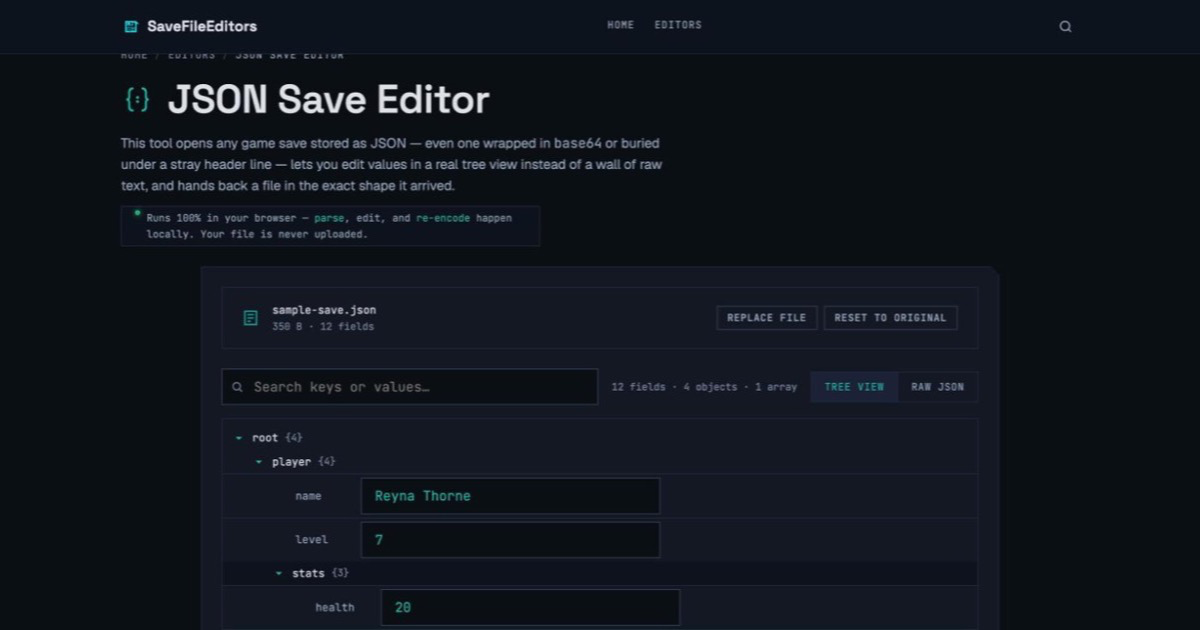
player.stats.health expanded and ready to edit.How This Tool Reads Near-JSON Files
The part most "generic JSON editors" skip. It's also the reason a naive one chokes on a real, messy save.
Whether you'd call it a JSON save editor, a JSON save file editor, or you typed save editor json because that's the order the words came out — it's the same tool you're after: something that opens a save file, shows you the values inside as something you can actually click into and change, and hands back a file the game will still load. Not every file a game calls a "JSON save" is clean, parseable JSON the moment you open it, though. A few things commonly stand between the file on disk and the readable data underneath — and getting each one wrong is how a generic editor either refuses to open the file at all, or silently reformats it into something the game's own loader doesn't expect:
- Real JSON has strict rules — and hand-rolled savers often break them. Standard JSON requires double-quoted keys and strings, no trailing commas, and no comments. A lot of indie and browser games build their save file by hand instead of using a real JSON library — string-templating a loop over inventory items, say — and it's easy to leave a trailing comma after the last one, or a debug note that never got cleaned up. The result looks like JSON to a human but fails a strict parser on the first character it doesn't expect.
- Wrapping isn't the same as corruption. Some games base64-encode the whole save file, partly so it doesn't look editable in a plain text editor. Others prepend a short version tag or other header line before the actual JSON block. Neither of these means the underlying data is broken — it just means the readable JSON is one layer deeper than the raw file you're looking at.
- Why a plain-text editor is risky here. Editing a save by hand in Notepad has no idea whether you just broke the file. A missing comma or an unmatched brace won't surface until the game tries to load it and fails, and by then you won't know which specific edit caused it. A validating tool catches a structural break the moment you make it, instead of the moment the game does.
- What this tool does differently. It never rewrites the parts of your file you didn't touch. It remembers exactly where each value's text sits in the file you gave it, and an edit becomes a surgical swap of just that value's characters — everything else, spacing and formatting included, comes back exactly as it was.
How to Use the JSON Save Editor
A worked example using a nested player.stats.health field, the same shape most game saves actually use.
Find your save file
Where it lives depends entirely on how this particular game was built — look for a .json, .save, or .dat file in the game's install folder or your OS's per-user app-data folder. If the game only runs in a browser and never writes a file, see the FAQ below for exporting its save from localStorage first.
Load it into the tool
Drag the file in, or click to browse. It's parsed in a background thread so a large file won't freeze the page, and this tool automatically tries plain JSON first, then a base64 unwrap, then a lenient cleanup for trailing commas or comments, before giving up with a specific error.
Find the field, by tree or search
As a concrete example: say your save has a nested player.stats.health field sitting at 20 and you want to set it to 100 before a hard fight. Type health into the search box to jump straight to it, or expand player → stats in the tree yourself — either way, replace 20 with 100 in the field that appears.
Use Raw JSON for bulk edits (optional)
If you'd rather work in plain text — pasting in a whole new object, say — switch to Raw JSON. It goes through the exact same validation as the tree view before anything downloads.
Download the result
Click Download Edited File. Before anything downloads, your edit is re-applied to a fresh parse of the file and checked that nothing structural moved. If that check fails, the download stays blocked instead of handing you a broken file.
Keep the backup until it's confirmed working
Load the downloaded file in the game before deleting or overwriting the original. If it looks right, replace the original with confidence; if something's off, you still have the file you started with.
What Makes a File "Valid JSON"
The common ways a real save file falls short of strict JSON, and exactly what this tool does about each one.
| Symptom | What it looks like | What this tool does |
|---|---|---|
| Trailing comma | {"gold": 100,} | Detected and stripped automatically during import; flagged in the import notice above the editor. |
// or /* */ comments | {"gold": 100 // cheat} | Stripped automatically the same way — the field's own value is never touched. |
| Base64-wrapped file | eyJnb2xkIjoxMDB9 | Decoded automatically before parsing, and re-encoded the same way on download. |
| Header/footer text | SAVE_V2
{"gold":100} | The JSON block is located and parsed on its own; the surrounding text is kept and reattached untouched on download. |
| Genuinely invalid JSON | {"gold": 100 (missing }) | Shown as a specific error naming what was tried — never a blank page or a silent failure. |
Frequently Asked Questions
Compatibility, safety, and what "invalid JSON" really means.
Yes, as long as the save is stored as JSON somewhere underneath — this tool doesn't know anything about any specific engine, it just finds the JSON and lets you edit it. To check: open the save file in a plain text editor. If it starts with { or [ and mostly looks like readable text with colons and quotes, it's already JSON. If it looks like a solid block of random-looking letters and numbers with no spaces, it's likely base64-wrapped JSON — this tool detects and unwraps that automatically, so try uploading it anyway.
Only if you skip the backup step first. This tool won't corrupt a valid save on its own: it never touches your original file, and before a download unlocks, your edit is re-applied to a fresh parse of the file and checked that the structure — every key and array length — matches what it was before. If that check fails, you get a specific error instead of a broken file.
JSON has a small, strict grammar: every key and string value has to be in double quotes, values are separated by commas but there's no comma after the last one in an object or array, and every { has a matching }, every [ a matching ]. The most common way a hand-edited or hand-rolled file breaks this: a trailing comma left after the last item, a code comment left in by mistake, or a stray unescaped quote inside a string. This tool tries to clean up the first two automatically; the next question covers what happens when even that fails.
No. Parsing, editing, and re-encoding all happen in your browser's own memory — nothing about your save is sent anywhere. You can verify this yourself: open your browser's developer tools, watch the Network tab while you use the tool, and you'll see nothing related to your file ever leaves the page.
Both are detected and handled automatically. If the whole file decodes as base64 into something that looks like JSON, it's unwrapped before editing and re-wrapped the same way on download. If there's a header line or other text before or after the actual JSON block, that surrounding text is set aside and reattached exactly as it was, untouched, when you download. One thing this tool doesn't attempt: a custom or double-layered encoding beyond plain base64 — if your save uses something more unusual, you may need to decode that layer yourself first.
For anything you don't edit, yes — down to the byte. This tool never runs your whole file through a generic reformatter; it finds the exact text span of the specific value you change and swaps only that. The one exception is the "cleaned up during import" case: if your file needed trailing commas or comments stripped just to become valid JSON in the first place, that cleaned version — not your original raw file — becomes the new baseline, and you'll see a notice on the page saying so.
A text editor just shows you characters. It has no idea whether what's on screen is valid JSON, and it won't stop you from leaving a dangling comma or an unmatched brace that only shows up as a problem once the game tries to load the file. This tool parses the file into an actual structure first: values show up in labeled fields with the right input type for what they are, a search box finds a field buried a dozen keys deep instead of you scrolling through a wall of text, and nothing downloads until the edit has been checked against a fresh parse of the file. The raw text is still there in the Raw JSON view if you want it — it's just not the only way to work.