Ren'Py Save Editor
Open a Ren'Py .save or persistent file here, change any saved variable, from money and affection points to flags and names, and download a save the game loads again. Add your own security_keys.txt and the edited save is re-signed, so Ren'Py won't ask whether it came from a different device.
Your save and your key are read in this browser tab and never sent anywhere.
Open and edit your Ren'Py save
Slot files look like 1-1-LT1.save, auto-1-LT1.save or quick-1-LT1.save. The editor reads the contents, so a renamed file is fine.
Copy the save somewhere safe before you start. If an edit goes wrong, putting that copy back is the whole fix.
No save handy?
From a short test game, saved by Ren'Py 8.5.3.
Reading the save…
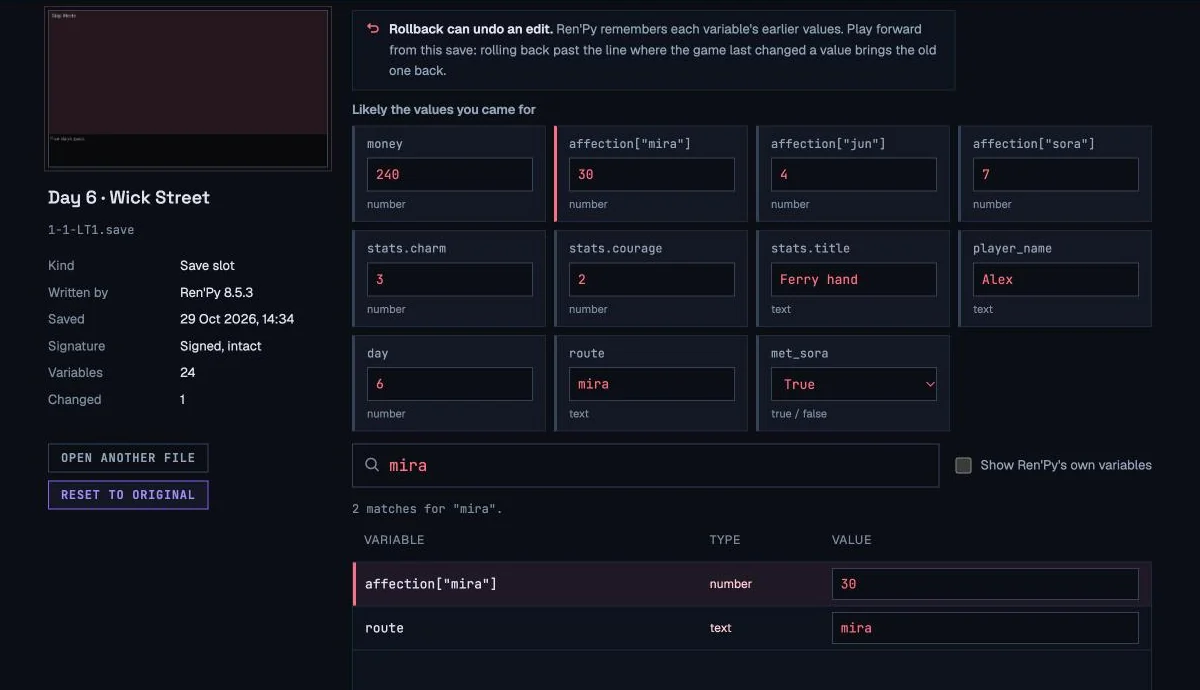
Rollback can undo an edit. Ren'Py remembers each variable's earlier values. Play forward from this save: rolling back past the line where the game last changed a value brings the old one back.
Likely the values you came for
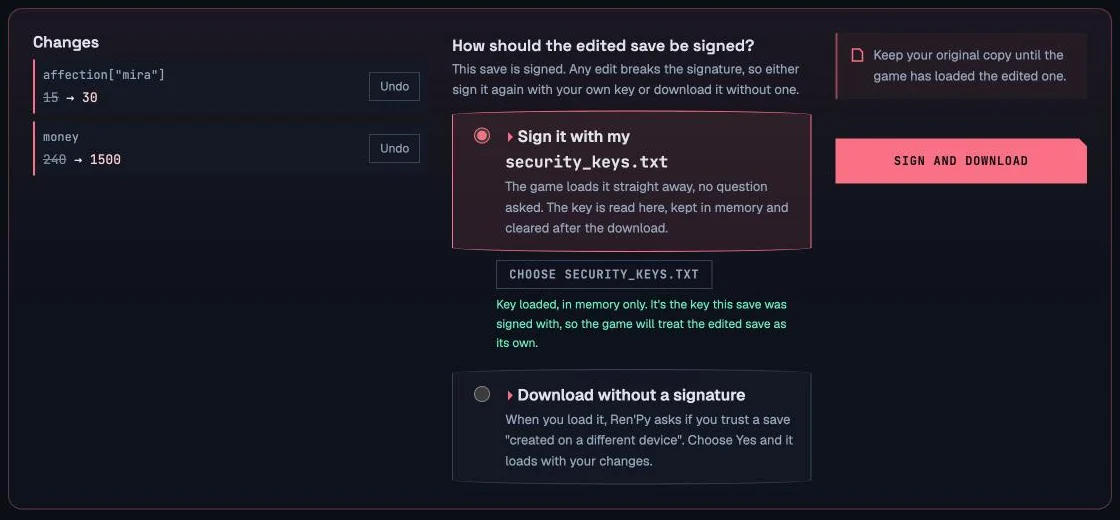
Changes
Nothing changed yet. Edit a value and it shows up here, old value to new.
Keep your original copy until the game has loaded the edited one.
What it looks like on a real Ren'Py save
How to Edit a Ren'Py Save, One Example Start to Finish
The sample save above comes from a short test game where you work a ferry and three people you meet have affection scores. Mira's is 15. This walk-through raises it to 30, which is exactly what you'd do to reach a route you keep missing.
- Ch. 1
Close the game and copy the save
Quit the game, then open its save folder and copy the slot you want, for example
1-1-LT1.savefor page 1, slot 1. Keep the copy somewhere safe: it's your way back. - Ch. 2
Open the save here
Drop the
.saveon the editor. The left panel shows the save's own screenshot, its name and the Ren'Py version that wrote it, so you can check it's the right slot before you change anything. - Ch. 3
Find the value
Type mira in the search box. In the sample save that brings up
affection["mira"], a whole number set to 15. Visual novels name these however their writers like, so if a search for a character's name finds nothing, try words like love, points or trust. - Ch. 4
Change it
Type 30 in the value field. The change appears in the list at the bottom, old value to new, with an undo button beside it.
Inside the save, that's two bytes:4B 0F4B 1Epickle's one-byte integer, 15 then 30. Every byte around it stays as Ren'Py wrote it. - Ch. 5
Choose how to sign it
Pick Sign with my security_keys.txt and add that file from the
tokensfolder, or pick Download without a signature and answer Yes when the game asks about a different device. - End
Download and put it back
Download the file, which keeps its original name, and copy it over the slot in the save folder. Start the game and load slot 1.
One quirk worth knowing: if the line you saved on changes the same variable, say the game adds 5 gold on that line, Ren'Py replays it when you load, so you'll see your number plus 5. The editor updates the copy Ren'Py restores for that replay and marks these edits in the change list. Nothing is lost; the game just finishes the line it was on.
Where Ren'Py Saves Live
Every Ren'Py game picks a folder name for itself, usually the game's name plus a number, like LanternStreet-1712. Look for that name inside these folders.
| Where | Save folder | security_keys.txt |
|---|---|---|
| Windows | %APPDATA%\RenPy\game-folder | %APPDATA%\RenPy\tokens |
| macOS | ~/Library/RenPy/game-folder | ~/Library/RenPy/tokens |
| Linux | ~/.renpy/game-folder | ~/.renpy/tokens |
| Inside the game | game/game/saves, a second copy, except in Mac app bundles and on phones | Not kept here |
| Android | Android/data/package name/files/saves | The same saves folder |
On a computer, Ren'Py usually writes each save twice: once in your user folder and once in game/saves inside the game itself. When it loads a slot it uses whichever copy is newer, so a freshly downloaded file wins wherever you put it. The persistent file is different: Ren'Py starts from the copy in your user folder and merges the game folder's copy into it, and in testing an edit placed only in game/saves was ignored. Replace the one in your user folder, or both.
Paste %APPDATA%\RenPy into the Windows Explorer address bar to jump straight there. On a Mac, press Shift+⌘+G in Finder and type ~/Library/RenPy. Games played in a web browser keep their saves inside the browser rather than in a folder, and Ren'Py's web builds never ask the different-device question.
Why the Game Says "This Save Was Created on a Different Device"
This save was created on a different device. Maliciously constructed save files can harm your computer. Do you trust this save's creator and everyone who could have changed the file?
gui.UNKNOWN_TOKEN in the engine's source.Since Ren'Py 7.6 and 8.1, the first game you run creates a key pair for your user account and keeps it in tokens/security_keys.txt. Every save the game writes then carries a signatures entry: an ECDSA signature, over the NIST P-256 curve with SHA-1, of the exact game data in the file. When you load a slot, Ren'Py checks that signature against the keys it trusts. Edit even one byte and the check fails, so Ren'Py assumes the file came from someone else and shows the question on the left.
The warning is there for a real reason. A Ren'Py save is a Python pickle, and loading a pickle can run code, so a save passed around online could be built to do harm. When the file is your own save that you changed yourself, though, the question only means the signature no longer matches.
There's one way an edit can fail completely: a save whose contents changed but whose old signature is still inside. Ren'Py asks the question, you click Yes, and then it checks the old signature against the new contents, which fails, and the save quietly doesn't load. That's what happens with tools that change the data and leave the signature alone.
Route A
Re-sign with your own key
Add your security_keys.txt and the editor signs the edited data the same way Ren'Py does, with your signing key. The game sees a save signed on this computer and loads it with no question. In testing, saves re-signed this way loaded without a prompt in Ren'Py 7.8.7, 8.1.3 and 8.5.3. Only the copy in this tab's memory is used, and it's wiped after the download.
Route B
Download it unsigned
The editor removes the stale signature completely. When you load the save, Ren'Py asks the question once; choose Yes and it loads with your changes, choose No and nothing happens. This route doesn't work for the persistent file, which Ren'Py simply ignores when its signature is missing.
How a Ren'Py Save Is Built
Rename a .save to .zip and it opens: it's an ordinary zip archive. These are the entries in the sample save.
screenshot.pngThe thumbnail on the load screen. 332,585 bytes here, by far the largest part.extra_infoThe save's name, if the game gives it one.jsonMetadata for the load screen: save name, Ren'Py version, playtime and the time it was saved.renpy_versionPlain text, here "Ren'Py 8.5.3.26051504".logThe game itself: every variable plus the rollback history, as a Python pickle. 12,794 bytes once decompressed.signaturesOne line per signing key: the public key and the signature, in base64. Missing from saves made before 7.6 and 8.1.
Everything you care about is in log. Ren'Py writes it with Python's pickle module, which turns live Python objects into a compact stream of opcodes: push this number, push this string, build a dictionary, call this class. Ren'Py used protocol 2 up to version 8.3 and switched to protocol 5 in 8.4, which adds framing with 8-byte length fields. On top of the zip's own compression, that's why a text editor shows nothing useful. Even after unzipping, the number 15 is the two bytes 4B 0F, and every string carries its length in front of it, so typing a longer name by hand shifts everything after it.
The pickle holds two things. One is the current value of every variable the game has changed since it started. The other is the rollback log, one entry per step you can roll back to, each holding the values from before that step. That second part is why editing a Ren'Py save properly takes more than finding a number and changing it.
The usual way to read a pickle is to unpickle it, which means letting it import and call whatever it names. This editor doesn't do that. It reads the opcodes one by one and records what they say: a class is just a name, and an object is a placeholder with its fields. Then it changes the bytes of the values you edit, and nothing else. A malicious save can't do anything here because nothing in it is ever run.
What You Can and Can't Edit
Some Ren'Py save file editors only reach simple top-level numbers, and some quietly leave a broken signature behind. Here's exactly what this one does.
| In the save | Here | Notes |
|---|---|---|
| Whole numbers, decimals, text, True/False | Edit | Money, points, day counters, names, flags. Numbers can be any size. |
| Values inside lists, dicts and the game's own objects | Edit | For example affection["mira"], inventory[0] or player.stats.charm. |
| The persistent file | Edit | Endings, unlocks and other cross-playthrough data. Must be signed on 7.6 / 8.1 and later. |
| Saves from Ren'Py 7.x (Python 2) | Edit | Text stays in the same kind of string it was saved as. |
| Values the line you saved on also changes | Edit | Updated together with the copy Ren'Py restores on load. If that copy can't be matched, the change list says the edit won't survive loading. |
| Earlier values in the rollback history | Kept | Left alone on purpose, so rolling back past a change brings the old value back. |
| Adding or removing variables, list items or keys | No | Only existing values change, which keeps the file's structure exactly as Ren'Py wrote it. |
| None, sets, byte strings, Ren'Py's own objects | View only | Shown and searchable, labelled "not editable here". Characters, images and audio state are engine objects. |
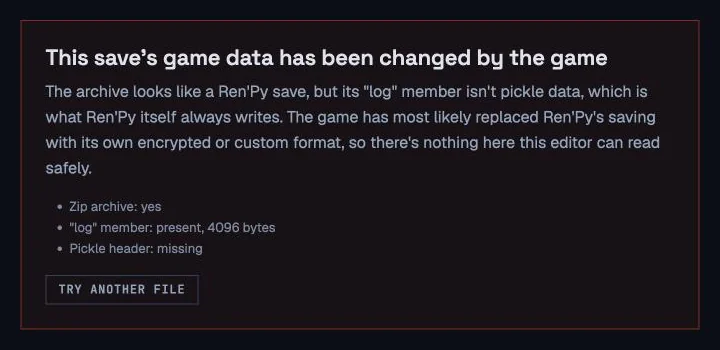
| Games with their own encrypted save format | No | Recognised and refused with a reason, never written back half-edited. |
Ren'Py Save Editing: Questions
Yes, as long as you keep a copy of the original. The editor never runs anything from your save: it reads the pickled data as plain bytes and changes only the values you type in. The real risk is to your playthrough, not your computer, since a value the story never expects, such as a negative day count, can confuse the game's script.
The editor itself works in a phone's browser. The hard part is reaching the file: Ren'Py's Android builds keep saves in Android/data/[package name]/files/saves, which many recent Android versions hide from file manager apps, so connecting the phone to a computer is often the easier way. On Android, security_keys.txt sits in that same saves folder.
Since Ren'Py 7.6 and 8.1, every save carries a signature made with a key that belongs to your computer. Editing the save makes that signature stop matching, so Ren'Py treats the file as coming from someone else and asks whether you trust it. Answering Yes loads it. To avoid the question entirely, sign the edited save with your own security_keys.txt in this editor.
It's the file named persistent in the save folder, and it holds everything that outlasts a single playthrough: endings you've seen, gallery and music-room unlocks, read text, and preferences. Games read it with the persistent. prefix, such as persistent.endings_seen. This editor opens it too, but on Ren'Py 7.6 and 8.1 and later it will only download a signed copy, because the game discards an unsigned one and starts over with an empty file.
It can. Ren'Py keeps the earlier value of every variable for each line you can roll back to, and this editor changes only the current value. If you roll back past the line where the game last changed that variable, the old value comes back. Rolling back a line or two where the value didn't change keeps your edit. To be safe, play forward from the loaded save.
No. The file is read, edited and rebuilt inside your browser tab, in a background worker, and nothing is sent anywhere. Your security_keys.txt is treated the same way: it's held in memory only while you sign, never stored, and cleared after the download. You can check it in your browser's developer tools: the Network tab stays empty while you use the editor.
If the game asks about a different device and then shows nothing, the file almost certainly still had its old signature, which Ren'Py rejects even after you say Yes. This editor never leaves one behind, so check you copied the downloaded file and not the original. If loading fails with an error, the game's script may not cope with the value you chose; put your backup back and try a smaller change.
It reads the formats Ren'Py has used across 7.x and 8.x: pickle protocol 2 through 8.3 and protocol 5 from 8.4, with or without signatures. It was tested on saves written by Ren'Py 7.4.11, 7.8.7, 8.1.3 and 8.5.3, each loaded back in that version after editing. Games that replace Ren'Py's saving with their own encrypted format are refused by name.
In a folder called tokens next to every game's save folder: %APPDATA%\RenPy\tokens on Windows, ~/Library/RenPy/tokens on macOS and ~/.renpy/tokens on Linux. Ren'Py creates it the first time you run any game made with 7.6 or 8.1 or later, and every Ren'Py game on that computer shares it. Treat it like a password: anyone who has it can make saves your computer trusts.
How It Was Tested
The format details on this page come from Ren'Py's own source (loadsave.py, savetoken.py, rollback.py and persistent.py), checked against tagged releases from 7.4 to 8.5. Test saves were written by the real engines, Ren'Py 7.4.11, 7.8.7, 8.1.3 and 8.5.3, from The Question and the Tutorial that ship with Ren'Py plus a small test game. Every edited save was then loaded back in the version that wrote it, to confirm the new values arrived, that a re-signed save loads with no question, and that an unsigned one gets exactly one. That's also how the rollback behaviour described above was confirmed, rather than assumed. If you have a save this Ren'Py save editor online won't open, send the details.